Skip to content

Best SaaS Websites: 363 Examples (And Why They Convert)

We scored 363 SaaS homepages on 60+ conversion criteria. See which sections separate the top performers, and what your page is probably missing.

Updated June 2026363 pages analyzed
#CompanyScore

Scored by AI across 60+ conversion criteria

ProductLed landing page
#1
79/100
Scroll to explore
Analyze your SaaS pageFree. Takes 2 minutes.

What the best SaaS websites get right

SaaS buyers are comparison-ready, demo-fatigued, and quick to bounce if the page does not answer "what does this do and why should I care?" in the first viewport. The strongest SaaS landing page examples in this benchmark do four things consistently:

51.1/100

Avg. page score

  • Nail visual hierarchy first. The top-performing pages use layout, contrast, and whitespace to guide the eye to one promise and one action before anything else competes for attention.
  • Keep a single focus per section. Pages that try to say everything above the fold lose to pages that say one thing clearly and back it with proof.
  • Show the product early. The strongest pages pair a specific claim with a real interface or workflow screenshot so the promise feels operational, not abstract.
  • Invest in navigation. Strong SaaS pages use navigation to route intent, not just list pages. Clear pathways help different buyers find their entry point fast.

6 best SaaS homepages analyzed in detail

Each company below is paired with its strongest section and scored across 60+ conversion criteria. See what they get right, and what you can borrow for your own SaaS landing page design.

01

ProductLed, A PLG community that teaches product-led growth through free tools and structured learning paths.

Editor's pick79/100
Gabriel AmzallagGabriel AmzallagFounder, Web Anatomy

ProductLed turns navigation into a conversion tool. The navbar (scored 100, top-scoring) uses a Free Tools mega menu with six tools and descriptions, groups them under a TOOLS header, and maps nav labels to the buyer journey (About PLG, Learn PLG, Implement PLG). The bold yellow APPLY NOW CTA creates unmistakable visual priority. This is the strongest navigation pattern in the SaaS dataset.

What makes this page stand out

  • Wes Bush as the instructor brings strong personal brand authority as bestselling author of "Product-Led Growth" and "The Product-Led Playbook" — the definitive books in the PLG space
  • The 9-week structured program with live sessions and certification creates commitment and completion incentives that typical self-paced courses lack
  • The $549 price point positions the program as accessible for individual contributors while being easy to expense for team purchases — smart pricing strategy
  • The PLG Scorecard diagnostic tool gives participants an immediate, personalized assessment — driving engagement before the program even begins

Section we love

·Cta
ProductLed Cta section
  1. 1One dominant action with an inline email field and Apply Now button removes any extra step to convert
  2. 2Urgency framing (The window is closing) plus the line about building it before someone else does pushes immediate sign-up
  3. 3Competitive fear angle (Your Competitors Are Already Working On This) gives a sharp reason to act now
02

Freckle, A data enrichment tool that turns messy contact data into clean, synced profiles in three steps.

78/100
Gabriel AmzallagGabriel AmzallagFounder, Web Anatomy

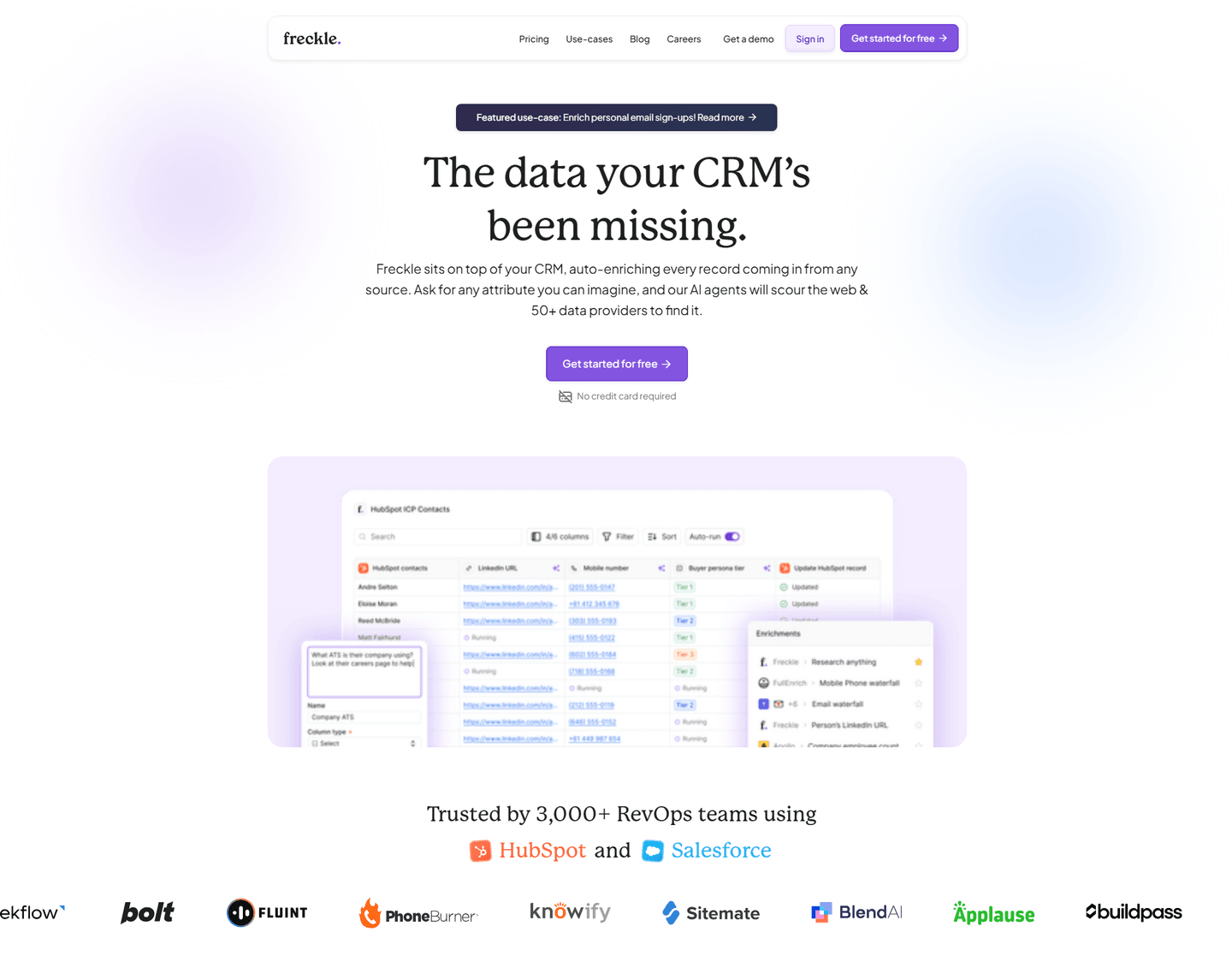
Freckle makes an invisible data workflow tangible. The how-it-works section (scored 100, top-scoring) uses bold action verbs (Import, Clean and enrich, Sync), a data flow diagram showing email to enriched profile, and multiple import options (CRM, webhooks, CSV). The "3 simple steps" headline sets expectations before the visitor even reads the details.

What makes this page stand out

  • The clear product explanation — sits on top of your CRM, auto-enriches every record from any source — makes the integration model instantly understandable for RevOps buyers
  • "Ask for any attribute you can imagine" positions the AI enrichment as limitless and flexible, differentiating from rigid enrichment tools that only provide pre-defined data fields
  • 50+ data providers aggregated into a single enrichment layer creates a genuine data breadth advantage over tools that rely on a single proprietary database
  • Product screenshot showing real HubSpot integration with enrichment in action makes the value tangible — buyers can immediately see how Freckle fits into their existing workflow

Section we love

·Hero
Freckle Hero section
  1. 1Problem-first headline (The data your CRM has been missing) hooks RevOps teams who already feel the gap in their pipeline
  2. 2Trusted by 3,000+ RevOps teams with HubSpot and Salesforce integration logos signals this fits their existing stack
  3. 3Real enrichment UI showing data fields and record matching gives prospects a concrete picture of the product at work
  4. 4Double risk reducers (Get started for free + No credit card required) remove every friction point from the first click
  5. 5Audience specificity at two levels: RevOps teams in the social proof and CRM users in the headline
03

Happeo, An intranet platform that unifies channels, pages, and people search for Google Workspace teams.

76/100
Gabriel AmzallagGabriel AmzallagFounder, Web Anatomy

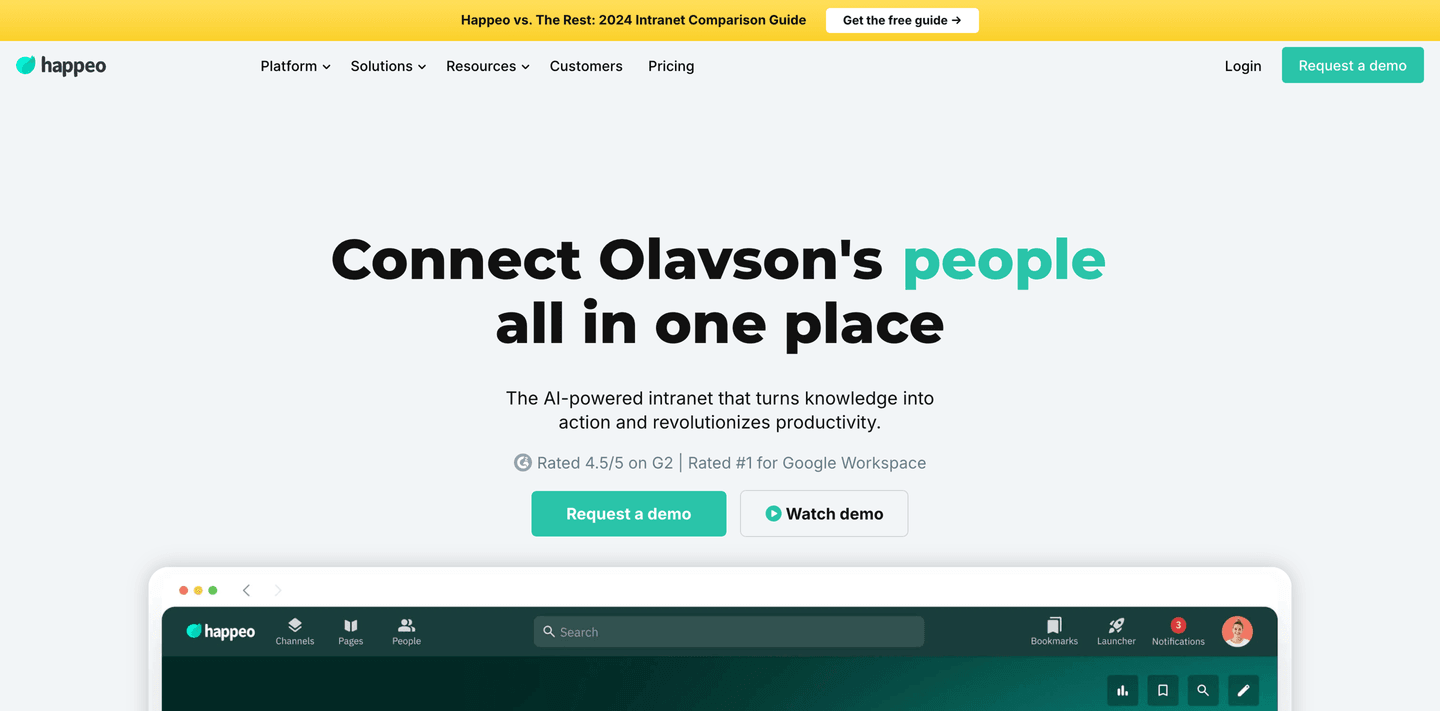
Happeo stacks social proof before the ask. The hero section (scored 78) layers G2 4.5/5 alongside a Rated number one Google Workspace badge, shows a real intranet UI with Channels, Pages, and People visible, and offers dual CTAs (Request demo plus Watch demo). The headline personalizes with the visitor's company name to increase relevance.

What makes this page stand out

  • "The intranet for companies that have outgrown drive, email and chat and need one official place without turning it into a 6-month project" — exceptionally specific pain point identification.
  • 4.5/5 G2 rating badge provides immediate credibility.
  • Dual CTAs "Request a demo" and "See pricing" give visitors both evaluation and pricing transparency paths.
  • Clean, modern design with teal accents signals a fresh alternative to legacy intranets.

Section we love

·Hero
Happeo Hero section
  1. 1Double social proof (4.5/5 on G2 and Rated number 1 for Google Workspace) builds strong credibility
  2. 2Real intranet UI showing Channels, Pages, People tabs proves the product is a working tool
  3. 3Dual CTAs (Request a demo) and (Watch demo) serve both active and passive buyer intent
  4. 4Headline personalizes with company name (Olavsons people) making it feel tailored to each visitor
  5. 5Clear product category (AI-powered intranet) with outcome promise (turns knowledge into action)
04

Openline

75/100

What makes this page stand out

  • The primary CTA “Estimate my pipeline” sits above the fold, with a secondary “Watch demo” link.
  • The nav includes “Pricing,” “Sign in,” and a repeated “Start today” button to drive immediate action.
  • The “Backed by:” row shows Y Combinator, Cocoa, Seedcamp, and Crane logos as investor credibility.
  • A customer quote section ends with “Read full story” and names “Matt McGillicuddy, Marketing Director” plus Infinity logo.

Section we love

·How It Works
Openline How It Works section
  1. 1Four clearly numbered steps (ICP, See who is ready to buy, Next best actions for SDRs, Insights for decision makers) map the full workflow at a glance
  2. 2Automation language (CustomerOS automatically generates your ICP, automatically pull together insights) signals the tool does the heavy lifting
  3. 3Each step pairs concise copy with a real product panel like the Stripe Account Brief accordion (Overview, Why they are an ICP fit, Pain points)
  4. 4Final step previews the payoff with a decision-maker dashboard showing ICP Qualification Rate and engaged-audience metrics
05

Perspective, A mobile funnel builder with structured education paths that teach users to convert faster.

75/100
Gabriel AmzallagGabriel AmzallagFounder, Web Anatomy

Perspective turns resources into a retention and conversion layer. The resources section (scored 60) offers three distinct paths (community, crash course, academy), names a real team member for credibility, and uses a wider bottom card to create visual priority. This pattern works well for SaaS companies with an educational content moat.

What makes this page stand out

  • "Easily create mobile-first, interactive, and personalized lead gen and sales funnels with market-leading conversion rates in just 30 minutes" packs multiple differentiators into one sentence: mobile-first, interactive, personalized, fast time-to-value.
  • "No design or coding skills required" removes the primary adoption barrier for the target audience (SMBs and agencies).
  • "Create free funnel in 30 min" CTA is brilliantly specific — the time commitment sets concrete expectations and makes the action feel achievable.
  • Dual review scores (G2 4.9, OMG 4.8) provide exceptionally high ratings that build immediate trust, complemented by "1k+ growth community" showing ecosystem engagement.

Section we love

·Resources
Perspective Resources section
  1. 1Heading Not sure where to start meets beginner anxiety and routes new users to the right resource
  2. 2All three resources (Community, Funnel Crash Course, Marketing Academy) center on funnel marketing, Perspective's core use case
  3. 3Original formats like a 60-minute live crash course and an Academy led by Head of Content Leni build real authority
  4. 4Each card carries a Learn more CTA that links into the deeper resource
06

Synapsa, A GTM intelligence platform that anchors its CTA around pipeline revenue generated for existing customers.

75/100
Gabriel AmzallagGabriel AmzallagFounder, Web Anatomy

Synapsa leads with outcomes, not features. The CTA section (scored 71) anchors with "$100M+ in pipeline generated" as a proof point, adds "Join hundreds of GTM teams" as social proof, and provides dual-path CTAs (Book Demo plus See Pricing) so both self-serve and sales-assisted buyers find their next step instantly.

What makes this page stand out

  • The "AI Sales Agent" category is simple and immediately understood: this isn't a copilot or assistant, it's an autonomous agent that handles outreach end-to-end
  • Differentiation against traditional SDR tools is clear: while competitors help humans sell faster, Synapsa replaces the manual outreach workflow entirely with AI-driven execution
  • The value proposition for lean sales teams (startups, SMBs) is compelling: enterprise-grade outbound capability without hiring a team of SDRs
  • Personalization at scale — the core promise — addresses the fundamental tension in outbound sales: you can send volume OR you can personalize, but doing both requires AI

Section we love

·Problem
Synapsa Problem section
  1. 1Quantified pain (for every 10 buyers who show interest, 7 never reach a conversation) makes the leak feel real
  2. 2Persona-specific framing speaks to sales reps who cannot tell good leads from bad ones until they are on the call
  3. 3Cost of inaction is concrete: paying for traffic that converts to nothing and warm leads choosing a competitor
  4. 4Emotional language (deals die, good leads get ignored, the system is broken) names the daily frustration

See how your page compares to the 51.1 SaaS average

Run a section-by-section diagnostic on your SaaS page and get prioritized fixes, then see how you stack up against these SaaS website examples.

Design patterns across these SaaS pages

Across 363 SaaS homepage examples, the pages that convert share a consistent trait: the first screen does one job well, state a clear promise, show the product, and make the next step obvious.

The strongest SaaS landing page design patterns pair visual clarity with single focus, then back the claim with proof that feels easy to verify. Restraint beats density for SaaS buyers scanning quickly. Pages that guide the eye to one promise and one action consistently outperform those that try to say everything at once. Explore our best landing page examples to compare how other industries resolve similar clarity problems.

Value Proposition Attribuly

100/100

How Attribuly presents their value

Attribuly value proposition section
  1. 1Four growth levers as separate cards, each headline carrying a number: retarget 2x, attribute 99%, grow email list 10x, richer analytics
  2. 2Every card has a custom data visual (50 to 90% donuts, channel journey graph, bar charts, funnel) that shows the lift, not decoration
  3. 3Mechanism is named, not vague: unifies Shopify, Meta, Google, Klaviyo and pushes server-side data into GA4, Looker Studio, BigQuery
  4. 4A Learn More link sits under every card so high-intent merchants can dig into a single lever

Reviewed design-pattern pick from Attribuly’s value proposition section.

What I love about this section

  • Four growth levers as separate cards, each headline carrying a number: retarget 2x, attribute 99%, grow email list 10x, richer analytics
  • Every card has a custom data visual (50 to 90% donuts, channel journey graph, bar charts, funnel) that shows the lift, not decoration
  • Mechanism is named, not vague: unifies Shopify, Meta, Google, Klaviyo and pushes server-side data into GA4, Looker Studio, BigQuery
  • A Learn More link sits under every card so high-intent merchants can dig into a single lever

Testimonial Lemlist

100/100

How Lemlist lets customers do the selling

Lemlist testimonial section
  1. 1Hard metrics headline each card (6x outbound, 5% to 30% of pipeline, 1.5x open rate) so the proof is verifiable
  2. 2The bold metric callouts (6x, 1,5x) are highlighted as the eye-catch above each story
  3. 3Customer logos (ElevenLabs, Airporting) sit on each card to tie the win to a known brand
  4. 4Before-after framing (from spam to strategy in 90 days) makes the transformation concrete and time-bound
  5. 5Discover full story links open the complete case study and the play icon adds a video testimonial

Reviewed design-pattern pick from Lemlist’s testimonial section.

What I love about this section

  • Hard metrics headline each card (6x outbound, 5% to 30% of pipeline, 1.5x open rate) so the proof is verifiable
  • The bold metric callouts (6x, 1,5x) are highlighted as the eye-catch above each story
  • Customer logos (ElevenLabs, Airporting) sit on each card to tie the win to a known brand
  • Before-after framing (from spam to strategy in 90 days) makes the transformation concrete and time-bound

Features SignOnSite

100/100

How SignOnSite showcases their product

SignOnSite features section
  1. 1Benefit-led headline (Let workers complete safety forms from their phones) leads with the outcome not the tool
  2. 2Pain-to-outcome copy contrasts chasing Site Managers for signatures against workers self-completing on mobile
  3. 3Before/after stat (40mins struck through to 6 mins) makes the time saving on inductions tangible
  4. 4Mobile app screenshots show the real form-completion flow as concrete outcome visualization
  5. 5Secondary features (Worker Passport, Briefings on Mobile) plus Download info pack link extend the story

Reviewed design-pattern pick from SignOnSite’s features section.

What I love about this section

  • Benefit-led headline (Let workers complete safety forms from their phones) leads with the outcome not the tool
  • Pain-to-outcome copy contrasts chasing Site Managers for signatures against workers self-completing on mobile
  • Before/after stat (40mins struck through to 6 mins) makes the time saving on inductions tangible
  • Mobile app screenshots show the real form-completion flow as concrete outcome visualization

Sections SaaS teams underuse (but visitors still look for)

Even with a strong hero, secondary sections often decide whether someone keeps scrolling, especially in competitive SaaS categories where buyers are comparing three or four tools simultaneously.

In this dataset, Navbar sections tend to outperform at 90.4 while Comparison sections are the most fragile at 33.6, suggesting many SaaS pages invest in messaging but leave gaps in wayfinding and competitive positioning that slow decisions. See how best fintech websites handle similar trust gaps in adjacent B2B categories.

Pricing Alchemy

100/100

How Alchemy creates pricing transparency

Alchemy pricing section
  1. 1Three clear tiers (Free $0, Pay As You Go $5, Enterprise Custom) each with a one-line description and target audience
  2. 2Interactive usage slider on the Pay As You Go card estimates cost across compute units (11M CUs) in real time
  3. 3Usage-based pricing spelled out (as low as $0.40/1M CUs, Use more save more) justifies the per-unit cost
  4. 4Most flexible badge plus a highlighted middle card anchors attention to the usage plan
  5. 5Tooltip icons on feature rows clarify CUs and limits, and For companies like logos add social proof per tier

Reviewed overlooked-section pick from Alchemy’s pricing section.

What I love about this section

  • Three clear tiers (Free $0, Pay As You Go $5, Enterprise Custom) each with a one-line description and target audience
  • Interactive usage slider on the Pay As You Go card estimates cost across compute units (11M CUs) in real time
  • Usage-based pricing spelled out (as low as $0.40/1M CUs, Use more save more) justifies the per-unit cost
  • Most flexible badge plus a highlighted middle card anchors attention to the usage plan

Navbar Administrate

100/100

Why this navbar works

Administrate navbar section
  1. 1Blue Book a demo button gives the navbar a clear, persistent primary conversion action
  2. 2Solutions mega menu splits into a USECASES column (Streamline operations, Compliance) and an INDUSTRIES column (Manufacturing, Healthcare and Medical) so visitors browse by task or vertical
  3. 3Featured SOLUTION and blog cards with images on the right of the dropdown add a richer content hierarchy
  4. 4Pricing link plus a Call sales phone number cover both self-serve and high-touch buyer paths

Reviewed overlooked-section pick from Administrate’s navbar section.

What I love about this section

  • Blue Book a demo button gives the navbar a clear, persistent primary conversion action
  • Solutions mega menu splits into a USECASES column (Streamline operations, Compliance) and an INDUSTRIES column (Manufacturing, Healthcare and Medical) so visitors browse by task or vertical
  • Featured SOLUTION and blog cards with images on the right of the dropdown add a richer content hierarchy
  • Pricing link plus a Call sales phone number cover both self-serve and high-touch buyer paths

How It Works Finary

100/100

How Finary simplifies the process

Finary how it works section
  1. 1The header Get started in 3 simple steps sets up a clean numbered 1 2 3 path
  2. 2Step 1 promises it is totally free and wont take more than three minutes, a concrete time commitment
  3. 3Step 2 notes connectors sync over 20,000 banks and institutions in the blink of an eye to stress how easy linking is
  4. 4Step 3 names the payoff (a clear overview of your finances plus investment tracking and insights)
  5. 5The phone mockup of the Link an Account screen shows real institutions (Revolut, Binance, HSBC) being connected
  6. 6A Lets start for free button sits right under the steps as the next action

Reviewed overlooked-section pick from Finary’s how it works section.

What I love about this section

  • The header Get started in 3 simple steps sets up a clean numbered 1 2 3 path
  • Step 1 promises it is totally free and wont take more than three minutes, a concrete time commitment
  • Step 2 notes connectors sync over 20,000 banks and institutions in the blink of an eye to stress how easy linking is
  • Step 3 names the payoff (a clear overview of your finances plus investment tracking and insights)

If you are refreshing a SaaS landing page design, treat navigation and comparison blocks as conversion infrastructure, not afterthoughts.

Checklist: a practical audit for SaaS website design

Built from 418 sections across 206 SaaS homepages in this benchmark. Each check below is a move the highest-scoring pages share, each paired with a real example from the benchmark.

Hero

Can a skeptical buyer tell what you do in five seconds?

  • The hero makes it instantly clear what the product is and who it's for.

    Example: Scoro states the category outright, then stacks a 4.5-star rating and Capterra and GetApp badges right under it.

  • The real product shows above the fold.

    Example: Scout opens on a live lead table showing real contacts at Microsoft, Salesforce, and Stripe instead of a hero graphic.

  • Proof is visible before the first scroll.

    Example: Livestorm surfaces recognizable logos like Ramp, Dolby, and NHS in the first screen, beside the signup CTA.

Trust

Does the page earn belief before it asks for anything?

  • Proof is quantified with a real number.

    Example: Benchling leads with 200,000 scientists and half of the world's top 50 biopharma companies.

  • The page mixes proof types instead of leaning on logos alone.

    Example: Ramp pairs a G2 5-star rating backed by 2,000+ reviews with recognizable customer logos.

  • A security or compliance cue answers the "is it safe" question.

    Example: Moloco runs a badge strip with five real seals, including SOC 2 Type 1, ISO 27001, and GDPR.

Value proposition

Is the value concrete, or just adjectives?

  • Benefits are specific.

    Example: Attribuly runs four growth levers as separate cards, each with its own number, like retarget 2x and attribute 99%.

  • The outcome is quantified with a number.

    Example: Qonto pairs two precise props side by side, "Rated and recommended" and "Secure and regulated," each with its own icon.

  • A deep-dive link lets a serious buyer go further.

    Example: SignOnSite ties its "find any document in a few clicks" headline to a real product dashboard a visitor can explore.

Features

Do features connect to outcomes the buyer cares about?

  • Feature copy leads with the outcome.

    Example: Plivo leads with outcomes like "human-like, not robotic" and "multilingual by default" instead of spec names.

  • Each feature maps a real pain to the fix that removes it.

    Example: Administrate names concrete pains, like an instructor calling in sick, then maps each to the fix the product delivers.

Call to action

Does the next click feel safe to a cautious buyer?

  • One primary action dominates, with action-led copy.

    Example: Ruul lets one bold "Open an account" button own the block with no competing CTA.

  • Reassuring microcopy sits next to the button.

    Example: Talknotes bakes the reassurance into the button itself with "Try TalkNotes free for 7 days."

The gap most SaaS pages leave open is pricing.

Pricing is the rarest section in the SaaS set. Of 206 companies benchmarked, only 28 expose a pricing block clear enough to score. The ones that do make the cautious buyer's job easy. PhotoRoom lines up four named tiers side by side, from Pro at $7.50 to Enterprise, each with a one-line who-it-is-for. Pages that hide pricing behind "contact sales" leave the cheapest trust on the table.

Five quick questions to see where your page stands against this SaaS benchmark. For a full section-by-section audit, try our landing page analysis.

Interactive quiz

What would your SaaS homepage score?

Question 1 of 5
0%

Can a visitor understand what your SaaS product does in under 5 seconds?

"Import, clean, and sync your contact data" beats "the all-in-one data platform for modern teams."

Gabriel Amzallag

Reviewed by

Gabriel Amzallag , Founder, Web Anatomy

5 years CRO + SEO at Qonto (2021–2025). After advising 15+ SaaS on their websites (Payfit, Pigment…), the same patterns kept breaking, so I decided to build the source of truth on what works on the web: the intelligence layer every tool, builder, and team uses to ship sites that perform.

See how your page compares to the 51.1 SaaS average

Run a section-by-section diagnostic on your SaaS page and get prioritized fixes, then see how you stack up against these SaaS website examples.

Analyze your SaaS pageFree. Takes 2 minutes.

Explore other industries

See how conversion patterns differ across verticals. Each page scores real homepages on the same framework.

See all industries
Benchmark-backed answers for SaaS website design

FAQ: Best SaaS Websites (Benchmarks)

Quick answers to common questions about what makes the best SaaS websites convert, based on section-level benchmark data from this review.

What makes the best SaaS websites different from average ones?

[01]

The best SaaS websites resolve "what does this do?" faster and with less cognitive load. The gap between strong and weak usually comes down to visual clarity, focus, and proof placement, not visual polish. Pages that guide the eye to one promise and one action consistently outperform those that try to say everything at once.

What sections should a SaaS homepage include?

[02]

A strong SaaS homepage typically includes a clear hero with one primary action, early social proof (logos, ratings, or a quantified outcome), a product visual or walkthrough, a focused features or use-cases section tied to outcomes, and a CTA that matches the buyer's readiness level. In this dataset, Cta, Features, and Hero are the three most common section types among top performers.

What is the biggest design mistake on SaaS landing pages?

[03]

Trying to say everything above the fold instead of saying one thing clearly. With an average page score of 51.1 across this dataset, many SaaS pages dilute their hero with competing messages, multiple CTAs, and no visible product proof, forcing the visitor to work harder than they should to understand the offer.

How important is navigation design for SaaS homepages?

[04]

More important than most teams realize. In this benchmark, Navbar sections averaged 90.4. The highest score of any section type. The strongest SaaS pages use navigation to route buyer intent (by use case, role, or journey stage) rather than mirroring internal product categories. ProductLed is a standout example, mapping nav labels to About PLG, Learn PLG, and Implement PLG.

What signals mean your SaaS homepage needs a rewrite, not just a tweak?

[05]

Three signals point to a rewrite rather than a tweak. First, new users keep asking sales what the product actually does. The hero isn't landing. Second, demo calls spend the opening minutes explaining the category instead of qualifying the buyer. The product proof isn't visible above the fold. Third, paid traffic bounces before scrolling past the hero. The offer isn't filtering intent. When two of three show up, the fix is positioning, not polish.

Where can I find great SaaS landing page inspiration?

[06]

Study SaaS pages section by section instead of saving full-page screenshots. Browse best landing page examples for the full gallery, then drill into hero section examples, trust section examples, and pricing section examples to see what the strongest SaaS homepages do differently at each stage of the funnel.

How do I audit my SaaS homepage before a redesign?

[07]

Use a structured rubric that checks clarity, proof, and friction instead of relying on subjective feedback. Run your page through the landing page analyzer for a section-by-section score.