Best Knowledge Management Website Examples (And Why They Work)
We reviewed 9 knowledge management homepages to see what makes them clear and convincing. See which parts separate the top performers, and what your page is probably missing.
What high-performing knowledge management website design gets right
The best knowledge management websites sell a clear outcome while proving the product can be trusted with a team's knowledge. The strongest pages we reviewed do four jobs early:
50.2/100
Avg. page score
Name the category in the first viewport so the buyer knows exactly what knowledge job the product owns.
Layer reassurance into the page before the ask, using named testimonials, quantified results, transparent pricing, or open-source proof.
Frame the cost of the status quo so the buyer feels the pain the product removes, not just the feature list.
Give a busy buyer a low-friction next step with specific CTA language and supportive microcopy.
5 best knowledge management homepages analyzed in detail
Each company below is paired with its strongest part of the page. See what they get right, and what you can borrow.
01
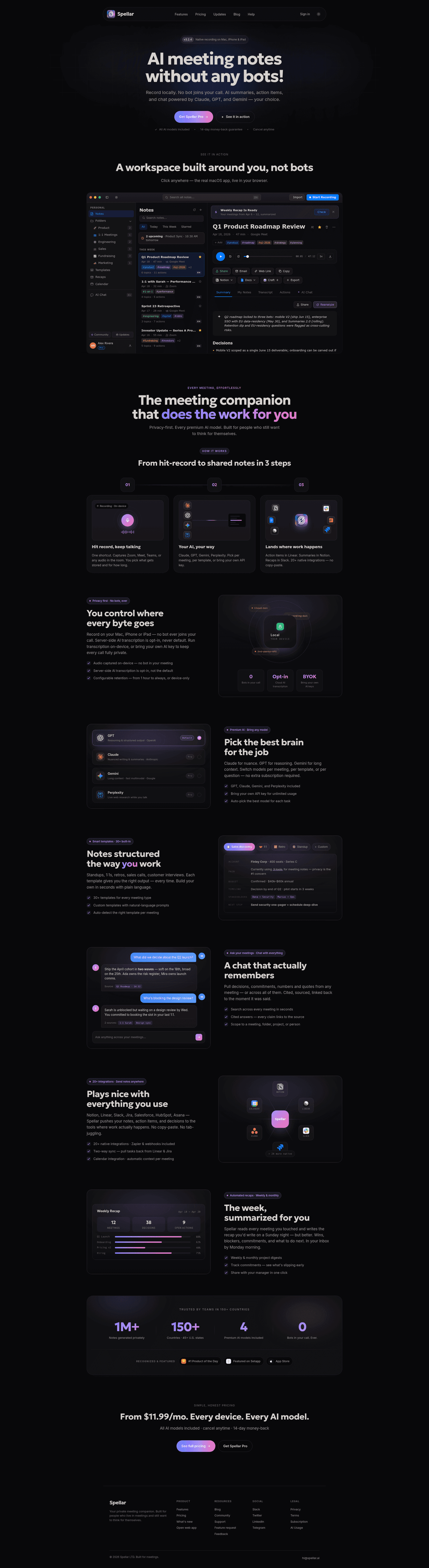
Spellar, Honest pricing and stacked reassurance, right up front.
5 years CRO + SEO at Qonto (2021–2025). After advising 15+ SaaS on their websites (Payfit, Pigment…), the same patterns kept breaking, so I decided to build the source of truth on what works on the web: the intelligence layer every tool, builder, and team uses to ship sites that perform.
“Spellar removes the budget question before features even start. A price-in-headline hook sits above three stacked risk reducers, and an anti-trick eyebrow frames the whole block as honest pricing. A primary gradient pill routes evaluators to detail while a second action catches ready buyers.”
What makes this page stand out
The hero CTA pair uses “Get Spellar Pro” and “See it in action” to capture paid and exploratory intent.
The microcopy line lists “All AI models included”, “14-day money-back guarantee”, and “Cancel anytime” directly under the CTAs.
The interactive workspace demo shows concrete UI like “Search all notes...⌘K” and “Import / Start Recording” controls.
The how-it-works section anchors benefits with “3 steps”, “20+ native integrations”, and “30+ templates” called out in copy.
Section we love
·Cta
1Price-in-headline hook (From $11.99/mo. Every device. Every AI model.) removes the will-this-fit-my-budget anxiety upfront
2Three risk reducers stacked (All AI models included, cancel anytime, 14-day money-back) directly under the price
3Primary gradient pill (See full pricing) routes evaluators to detail while Get Spellar Pro catches ready buyers
4Eyebrow tag (Simple, honest pricing) frames the whole block with an anti-trick promise
02
Scribehow, Human testimonials and hard numbers under one proof headline.
5 years CRO + SEO at Qonto (2021–2025). After advising 15+ SaaS on their websites (Payfit, Pigment…), the same patterns kept breaking, so I decided to build the source of truth on what works on the web: the intelligence layer every tool, builder, and team uses to ship sites that perform.
“Scribehow proves results from three angles at once. Customer cards pair company logos with named, photographed people and titles, each led by a quantified result, and a row of stat counters reinforces the proof at scale under one results headline.”
What makes this page stand out
The subhead promises “Instantly capture and optimize workflows” for “teams & AI agents” in one line.
The trust bar shows a 5‑stars graphic plus “over 5 million users” and “78,000+ enterprise customers”.
The navigation uses a dense mega-menu grouping Products, Platform, “By function,” and “By use case” with icon tiles.
The top-right CTAs pair “Get Started” with “Talk to Sales,” alongside “Sign in” for returning users.
Section we love
·Trust
1Three customer cards pair company logos (Artex, Cornells, Paycor) with named people, photos and titles for human credibility
2Quantified results lead each card (50% less training time, 98% procedure compliance, hours-to-minutes documentation)
3Bottom stat counters (75% faster docs, 35 hours saved per month, 98%) reinforce the proof at scale
4Proof diversity stacks logos, named-photo testimonials and metric counters under one Real results headline
03
Tigerhall
61/100
What makes this page stand out
The hero headline 'The System Built for Smarter Transformation' pairs with links to 'Product Overview' and 'Why Tigerhall'.
Customer logos under 'Fortune 500s’ Change Activation Platform of Choice' show Accenture and AWS credibility above the fold.
The results strip quantifies outcomes with '3 Days' launch, '75-90%' less manual work, and '87%' adoption.
The bottom CTA 'Schedule a 30-Minute Demo Today' embeds a calendar, shows SOC 2 Type II and GDPR badges.
Section we love
·FooterBest in class
1Eight labeled columns (Get Started, Product, Use Cases, By Role, About, ECLC, Resources) make a deep site scannable
2Footer CTA card (What's Slowing Down Your Transformation? Reveal in 2-Min Quiz) captures last-chance leads
3Compliance seals (SOC 2 Type II, GDPR Approved) reassure enterprise buyers right at the page bottom
4G2 badges (Users Love Us, High Performer Winter 2022) and app store buttons echo proof and reach
04
Bulkmark, A problem section that quantifies the cost of doing nothing.
5 years CRO + SEO at Qonto (2021–2025). After advising 15+ SaaS on their websites (Payfit, Pigment…), the same patterns kept breaking, so I decided to build the source of truth on what works on the web: the intelligence layer every tool, builder, and team uses to ship sites that perform.
“Bulkmark makes a quiet problem feel urgent. Three big stats quantify the pain at a glance, an aggregate behavior stat proves it is widespread rather than personal, and vivid copy makes the frustration relatable before any pitch arrives.”
What makes this page stand out
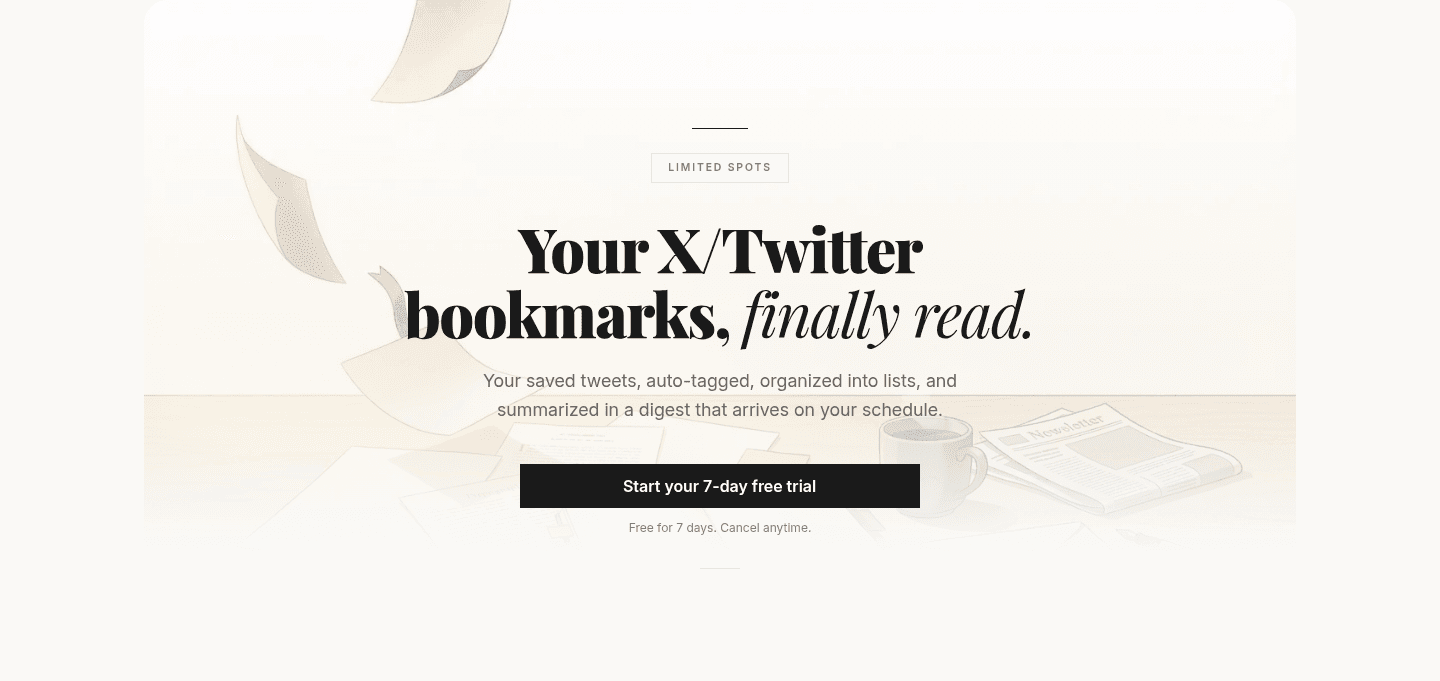
The above-fold urgency tag says “Limited spots,” reinforcing scarcity before any scrolling.
The problem section quantifies pain with “3,000+,” “97%,” and “12 sec” in bold metric-first tiles.
The product walkthrough uses “Demo · 60 sec” plus “No sound required. Captions inside.” to reduce viewing friction.
The pricing table highlights “$59/yr -40%” and “40 of 50 remaining,” plus “Your price stays the same.”
Section we love
·Problem
1Three big stats (3,000+ saved, 97% never opened, 12 sec digest) quantify the pain at a glance
297% never opened again uses an aggregate behavior stat to prove the problem is widespread, not personal
3Vivid copy (X/Twitter buries them, treats bookmarks as a write-only database) makes the frustration relatable
4Cost of the status quo is explicit: saved tweets you will never scroll back through are wasted effort
05
Tettra
56/100
What makes this page stand out
The feature layout uses repeated screenshot-plus-icon modules titled “Internal Knowledge Base,” “Questions & Answers,” and “Knowledge Management.”
The AI section names the Slack-integrated bot “Kai” and promises “Instanly answer questions with AI trained on your knowledge.”
The social proof grid shows Techstars, Fortnox, and SmartBug logos, each paired with a short quoted outcome.
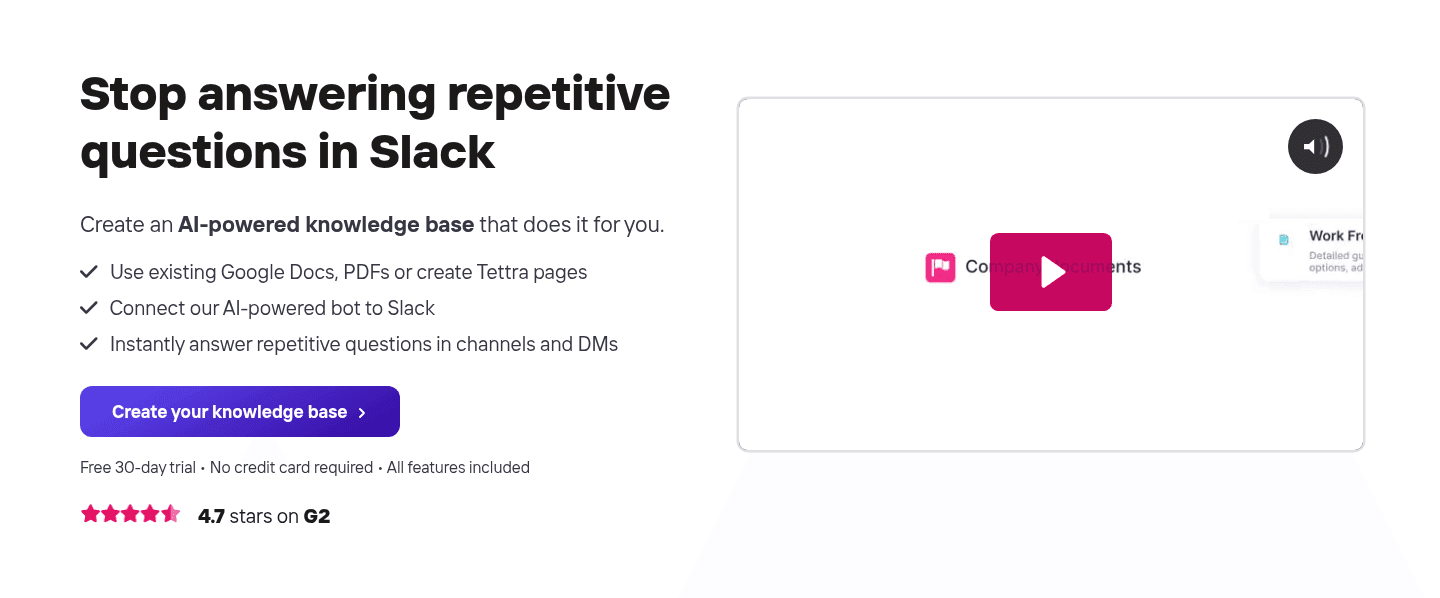
The final CTA block repeats urgency with “Start building your knowledge base today” and a single button “Create your knowledge base.”
Section we love
·CtaBest in class
1Single dominant CTA (Create your knowledge base) with no competing buttons keeps the action focused
2Reassuring microcopy (Free 30-day trial, No credit card required, All features included) sits right under the button
3Product video with play button shows the real Tettra interface and Slack workflow in action
4Outcome-led copy (Stop answering repetitive questions in Slack) ties the click to a concrete result
54.7 stars on G2 next to the CTA adds quick third-party proof at the decision point
06
Marqly, Category clarity and a real product shot above the barrier.
5 years CRO + SEO at Qonto (2021–2025). After advising 15+ SaaS on their websites (Payfit, Pigment…), the same patterns kept breaking, so I decided to build the source of truth on what works on the web: the intelligence layer every tool, builder, and team uses to ship sites that perform.
“Marqly leads with instant comprehension. The headline names the category outright, the subhead bakes in the differentiation, and a single no-card CTA removes the signup barrier. A large real product screenshot shows exactly what users get below the fold.”
What makes this page stand out
The primary CTA “Get Started for Free →” sits beside “No card required · Works on every device”.
The product mockups emphasize speed with “Tagged in 0.3s” and search results showing “0.04s” and “0.06s”.
The Chrome Web Store embed shows ★★★★★ 4.9 and “200k+ users” next to a “+ Add to Chrome” button.
The pricing table highlights “Free $0 forever” versus “Pro $9 per month” with a “Yearly Save 50%” toggle.
Section we love
·Hero
1Headline names the category outright (The Bookmark Manager supercharged with AI) for instant comprehension
2Differentiation baked into the subhead (Search by context, not keywords) sets it apart from plain bookmark tools
3Single action CTA (Get Started for Free) with No card required microcopy removes the signup barrier
4Large real product screenshot of the bookmark dashboard shows exactly what users get below the fold
See how your page compares to the 50.2 average page score
Run a quick check on your knowledge management page and get a part-by-part read of what to fix first to improve clarity, trust, and product proof.
Design patterns we see across the best knowledge management pages
Across 9 knowledge management pages we reviewed, the pages that work tend to make the first screen do one job: name the knowledge problem and prove the product can be trusted with the answer.
The strongest patterns pair a single, clear action with proof a first-time visitor can check at a glance, whether that is a stat-led trust bar, a featured-in row, or a free trial with a reason to start now. This matters in knowledge management website design, where the buyer is handing over the thing they care about most: what their team knows. Use best landing page examples to compare how these building blocks show up across page types.
2Each number labeled with the exact metric (Retrieval R@5 · LongMemEval-S, Fewer input tokens per session, Tests passing) so devs can audit not just admire
30 External Databases pairs a quantified claim with a zero — a high-leverage way to show simplicity as a metric
4Yellow giant-figure typography against the matte black makes the entire bar readable from arm length
Reviewed design-pattern pick from Agentmemory’s trust section.
What I love about this section
Six engineering stats in one row (95.2% Retrieval R@5, 92% fewer input tokens, 53 MCP tools, 12 autohooks, 0 external databases, 1112 tests passing)
Each number labeled with the exact metric (Retrieval R@5 · LongMemEval-S, Fewer input tokens per session, Tests passing) so devs can audit not just admire
0 External Databases pairs a quantified claim with a zero — a high-leverage way to show simplicity as a metric
Yellow giant-figure typography against the matte black makes the entire bar readable from arm length
Overlooked sections that quietly drive clarity and trust
In this set, integration, how-it-works, and pricing sections often do more work than teams expect: they show the product fits the tools the buyer already uses, make the process feel easy, and clear up plan confusion before the buyer hesitates.
The biggest gaps usually show up where the page should tie the product to real outcomes in plain language. When those sections are thin, the hero is left to do all the trust work, and visitors are left guessing about fit.
1Eyebrow (20+ integrations · Send notes anywhere) plus the +24 more native badge in the orbit make the ecosystem scale concrete
2Logo orbit (Notion, Calendar, Linear, Asana, Slack, Jira) borrows credibility from six tools the target user already lives in
3Use case in the subhead (pushes your notes, action items, and decisions to the tools where work actually happens) names the outcome
4Three checkmark proofs (20+ native integrations · Zapier and webhooks included, Two-way sync — pull tasks back from Linear and Jira, Calendar integration · automatic context per meeting) cover the integration-quality concerns
Reviewed overlooked-section pick from Spellar’s integrations section.
What I love about this section
Eyebrow (20+ integrations · Send notes anywhere) plus the +24 more native badge in the orbit make the ecosystem scale concrete
Logo orbit (Notion, Calendar, Linear, Asana, Slack, Jira) borrows credibility from six tools the target user already lives in
Use case in the subhead (pushes your notes, action items, and decisions to the tools where work actually happens) names the outcome
Three checkmark proofs (20+ native integrations · Zapier and webhooks included, Two-way sync — pull tasks back from Linear and Jira, Calendar integration · automatic context per meeting) cover the integration-quality concerns
Use the examples below as prompts for what to standardize, not just what to redesign.
Checklist: a practical audit for knowledge management website design
If you are reworking a knowledge management homepage design, this checklist helps you spot missing parts and unclear messaging quickly, especially around Cta, Trust, and Value Proposition.
Built from 29 sections across 7 knowledge management homepages in this benchmark. Each check below is a move the highest-scoring pages share, each paired with a real example from the benchmark.
Hero
Can a visitor tell what you do and who it is for in five seconds?
The hero names the product category outright.
Example: Marqly names the category in the headline (The Bookmark Manager supercharged with AI) for instant comprehension.
A primary action and proof sit above the fold.
Example: Agentmemory stacks a featured-in row above the fold (AlphaSignal 180K subscribers, Linux Foundation backing, GitHub Trending #1) in a single strip.
Trust
Does the page earn belief before it asks for anything?
Proof is quantified with a real number.
Example: Spellar runs a four-stat row (1M+ notes generated privately, 150+ countries, 4 premium AI models, 0 bots in your call ever).
The page mixes proof types instead of leaning on one.
Example: Scribehow pairs company logos (Artex, Cornells, Paycor) with named people, photos, and titles for human credibility.
Value proposition
Is the value concrete, or just adjectives?
The headline names the outcome in user language, not jargon.
Example: Spellar leads with You control where every byte goes, naming the privacy outcome instead of security jargon.
Features
Do features connect to outcomes the buyer cares about?
Feature copy leads with the outcome, not the feature name.
Example: Tigerhall uses benefit-led card headers (Reach the right audiences with the right messages at the right time) ahead of feature names.
The page lets prospects see their own use case.
Example: Spellar shows a tabbed template strip (Sales discovery, 1:1, Retro, Standup) so prospects spot their exact meeting type.
Call to action
Does the next click feel safe to a cautious buyer?
One dominant button uses action-led copy with no competing links.
Example: Tettra keeps a single dominant CTA (Create your knowledge base) with no competing buttons.
A reassuring or risk-reducing line sits with the button.
Example: Bulkmark leads with a single black CTA (Start your 7-day free trial) that names the trial and removes friction.
The gap most knowledge management pages leave open is pricing.
Pricing is the rarest section in this knowledge management set. Of the 7 products benchmarked, only 1 exposes a pricing block clear enough to score. Bulkmark locks a single clear price (Founders $59/yr, about $4.92/mo) and shows the next prices on a timeline, so there is no tier confusion. Pages that hide cost behind a sign-up leave the cautious buyer guessing.
Run it on your current page, then decide what to rewrite, what to reorder, and what proof to add before you touch visual polish. For a faster starting point, you can also analyze your knowledge management page.
Interactive quiz
What would your knowledge management homepage score?
Question 1 of 5
0%
Can a buyer identify what your knowledge tool does in under 5 seconds?
"The bookmark manager supercharged with AI" beats "unlock your team's collective intelligence."
Reviewed by
Gabriel Amzallag , Founder, Web Anatomy
5 years CRO + SEO at Qonto (2021–2025). After advising 15+ SaaS on their websites (Payfit, Pigment…), the same patterns kept breaking, so I decided to build the source of truth on what works on the web: the intelligence layer every tool, builder, and team uses to ship sites that perform.
Knowledge management homepage inspiration, grounded in real pages
Knowledge Management FAQ
Quick answers based on the knowledge management websites we reviewed.
What are the best knowledge management websites?
[01]
The strongest performers we reviewed are Spellar, Scribehow, and Bulkmark, with Marqly and Agentmemory rounding out the detailed analysis. Across 9 knowledge management homepages, these pages win by pairing a clear promise with fast proof: Spellar's honest pricing and stacked reassurance, Scribehow's testimonials that show real named people next to results, and Bulkmark's problem section that makes the status quo feel costly.
What makes knowledge management websites harder to sell?
[02]
The buyer is handing over the thing their team cares about most, what they know, so trust has to land before the feature pitch. Across 9 homepages we looked at, the pages that win make reassurance easy to see early: Spellar stacks honest pricing with three reasons not to worry before features start, Scribehow opens each customer card with a real result, and Agentmemory lets people compare it on a sourced matrix without leaving the page.
What is the biggest design mistake on knowledge management homepages?
[03]
Leaning on polished visuals while leaving proof thin, especially real testimonials. The average page we reviewed scored 50.2, and weak proof is the most common gap. The pages that fix it answer "why trust you?" early: Scribehow pairs company logos with real named people and their results, while Spellar packs scale, reach, and its privacy promise into a single four-stat trust bar.
What sections should a knowledge management homepage include?
[04]
A hero that names the category, an early trust layer such as real testimonials or honest pricing, a problem section that makes the status quo feel costly, a real product or how-it-works visual, and a clear next step. The parts that work hardest are Cta, Trust, and Value Proposition. Across 9 pages, the ones that skip the trust layer lose buyers before they reach the product.
How does a knowledge management homepage build trust before the ask?
[05]
The strongest pages make proof easy to see in the first screens instead of saving it for later. Scribehow gathers several kinds of proof under one results headline, pairing company logos with real named customers and live counters. Spellar runs a four-stat trust bar that pulls together scale, reach, and its privacy promise, then borrows credibility with featured-in chips. Trust is the part that does the most work across these 9 pages.
How many knowledge management examples should I review before redesigning?
[06]
Three to five is enough if you compare them part by part rather than saving full-page screenshots. The gap is concentrated in a few blocks, so study the pages that win each one: Spellar for honest pricing and a trust bar, Scribehow for layered proof, Bulkmark for a problem section that puts a number on the status quo, Marqly for category clarity above the fold, and Agentmemory for a sourced comparison matrix.
Where can I find great inspiration for my knowledge management website?
Use a simple checklist for clarity, trust, and friction instead of relying on gut feel. Run your page through the landing page audit for a part-by-part read against the same questions we used to review these pages.